

In virtualization environments where a storage system is used, file copy and move operations by default are performed through the virtual server. This leads to additional resource consumption (CPU, memory, and I/O) for both the physical and virtual servers. In addition, it creates extra load on the storage traffic during data transfer.
For example, in virtualization environments, during snapshot and clone operations, the copy traffic first reaches the physical server (hypervisor) and is then sent back to the storage system. In such cases, CPU and RAM utilization on the physical server increase, while at the same time, network / SAN traffic may create serious bottlenecks. These load fluctuations can result in performance degradation for organizations providing mission-critical services, ultimately leading to customer dissatisfaction.
VAAI (vStorage APIs for Array Integration) is an API layer introduced by VMware with ESXi 4.1, designed for storage system and software vendors. When VAAI is not used, VMware ESXi servers route copy and migration traffic through the hypervisor. This situation may increase costs and cause potential service interruptions.
NGX Storage supports the full set of VMware VAAI commands across its entire product family. With this support, storage-related operations are handled entirely by the storage system itself, eliminating unnecessary load on the physical server.
VMware VAAI Features Supported by NGX Storage
- Atomic Test & Set (ATS)
- Clone Blocks / Full Copy / XCOPY
- Zero Blocks / Write Same
- Block Delete (supported on ESXi 5.x and later hosts)
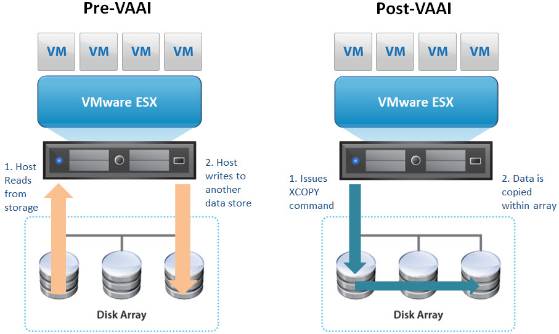
Figure 1: The chart above shows the state before and after VAAI is enabled.
NGX Storage automatically enables VMware VAAI technology.
No additional configuration or plugin installation is required to benefit from this technology.
As shown in the images below, you can verify that VAAI is active under the Hardware Acceleration tab. The “Supported” status displayed in this section indicates that the VAAI commands are supported and enabled.

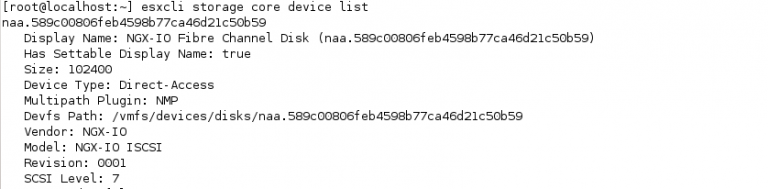

Figure 3: The status of the VAAI technology can be verified through the relevant query in the VMware esxcli command-line interface.
NGX Storage enables full utilization of VAAI features without requiring any additional plugins. This ensures a simple, seamless, and highly efficient implementation.